Access issues and repeated questions
Password and login questions fill your team's WhatsApp.
SEION connects to the learning platform you already use, your CRM and WhatsApp. It answers access and course questions at any time, follows up with every prospect and flags students who are falling behind. No platform change required.
Request your free assessment →How it works →
In online learning, questions come in at any time. Without a quick response, some students drop out and prospective learners choose another provider.
Password and login questions fill your team's WhatsApp.
If you take too long to respond, they may enrol elsewhere.
Enquiries surge with every new intake.
Spot signs of disengagement and act in time.
Handle enrolments, payments and certificates with fewer follow-ups.
Connect your LMS, CRM and channels. Stop copying data.
24/7 responses
Prospect follow-up
Inactivity alerts
Fewer repetitive tasks
SEION connects to your LMS, CRM and communication channels to support learners, automate tasks and alert your team when a human needs to step in.
We adapt to your systems. Here are some common examples:
| Category | Examples |
|---|---|
| Learning platforms (LMS) | Moodle, Chamilo, Canvas, TalentLMS, Docebo |
| CRM | HubSpot, Salesforce, Zoho CRM, Pipedrive |
| Communications | WhatsApp Business, Gmail, Outlook, telephony |
| Live classes | Zoom, Google Meet, Microsoft Teams |
| Payments | Stripe, Redsys |
| Administration | ERP, subsidised training software, spreadsheets |
Using another tool? We'll review it with you.
Automate enquiries, documentation and follow-up for subsidised courses.
Respond quickly and guide learners through enrolment.
Manage enquiries and remind students about assignments, exams and key dates.
Answer enquiries, collect details and guide each enrolment.
Answer questions, remind students about tasks and spot those who need help.
Send certificates, gather feedback and recommend the next course.
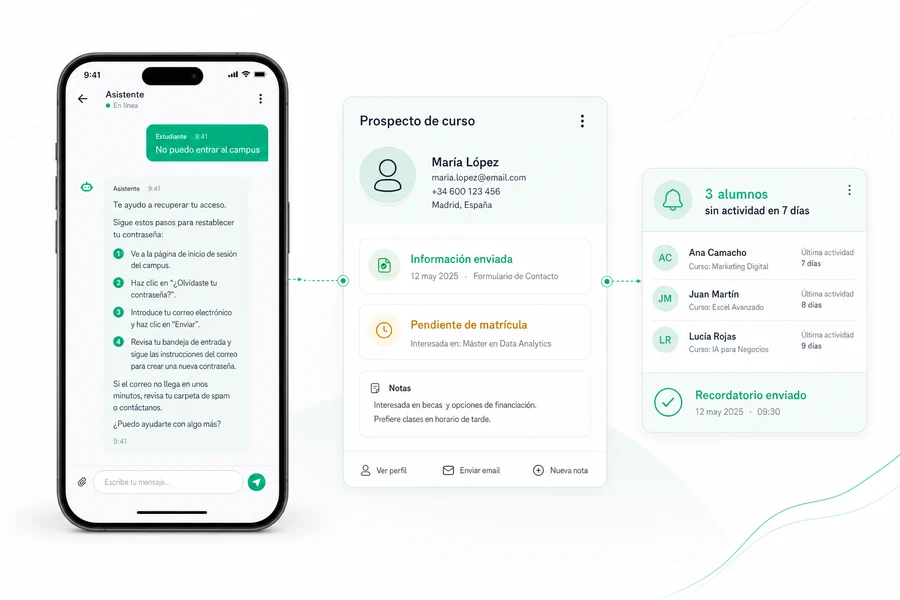
A student cannot access the campus the night before an assignment is due. SEION guides them through restoring access and alerts the team if additional help is needed.
Answer questions about access, courses and schedules.
Respond to every prospect and keep follow-up moving.
Streamline enrolments, payments and certificates.
Spot inactivity and encourage learners to continue.
We start with the task that takes the most time from your team. Timing depends on the project.
We review enquiries, your platform, CRM and channels.
We define priorities, connections and hand-offs to your team.
We test the priority use case and expand safely.
No. SEION is not an LMS or training platform. It connects to the platform you already use to access and update information, while your courses stay where they are.
We adapt to the platform and CRM you use. During the assessment, we review your systems and explain how they can connect.
The languages you need. If your learners are based in different countries, SEION can respond in their language.
It hands the conversation to your team with the full context. You decide which topics always need a person.
It depends on the use cases, channels and systems to connect. After the free assessment, we provide a tailored quote.
No. It handles repetitive enquiries and follow-up, so tutors and staff can focus on the learners who need them most.
About two months, delivered in phases depending on the project. We start with the use case that takes the most time from your team.
Tell us how your learning centre works and which platform you use. We’ll show you which enquiries and tasks AI could handle and how it could connect to your systems.
No obligation
We review your platform, CRM and channels
We suggest the first use cases
A project quote tailored to your needs